Setting Rules for Automatic Email Handling in Outlook for Mac
 Print
Print Email
EmailInstructions for setting up rules to allow Outlook for Mac to automatically sort specified emails.
- Select the Email you wish to add the rule for.
- Select Rules from the Ribbon.
- Select Create Rule.
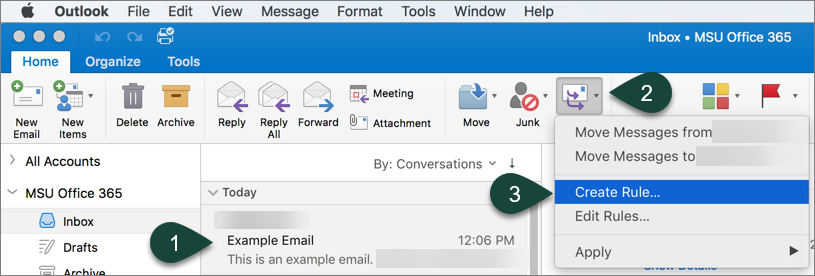
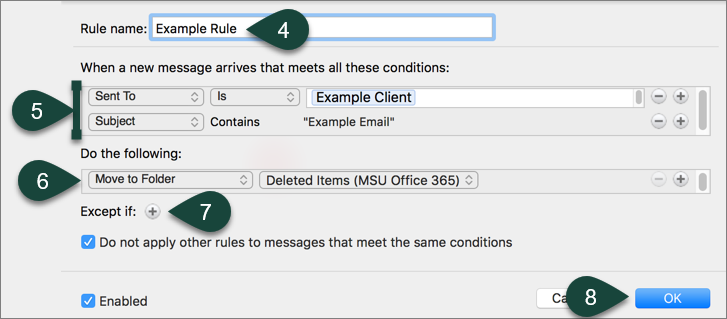
- Enter the Rule Name.
- Select the Conditions.
NOTE: Some will be automatically filled in based on the email you selected. You can change these settings or add more using the Plus and Minus sign on the right side. - Select how the rule will handle the email in the Do the Following section.
- Select the Plus Sign to add any Exceptions.
- Select Ok.
Did you find this article useful?
You Might Also Be Interested In
-
In the Field: Jenn Phillips
Published on July 6, 2018
-
Employee Antivirus Perk
Published on September 18, 2023
-
Sending from an Alternate Email Address in Spartan Mail Online (Office 365)
Published on March 31, 2021


-
Mapping a Network Drive (Mac)
Published on June 4, 2020
-
Setting the Default Calendar on Apple Devices (Office 365)
Published on April 22, 2021
-
Sending from an Alternate Email Address in Outlook
Published on March 31, 2021