Mapping a Network Drive (Mac)
 Print
Print Email
EmailInstructions for mapping a network drive to your Mac computer.
- From the Finder, select Go.
- Select Connect to Server.
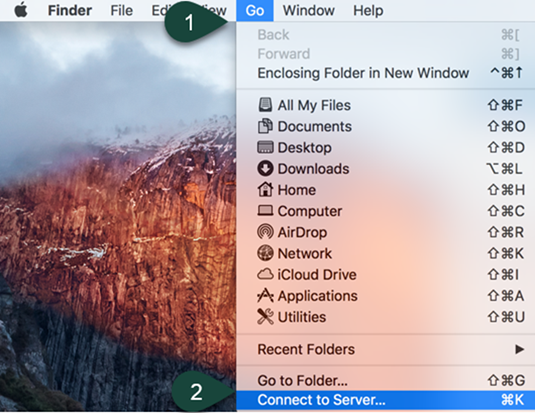
- In the Server Address field, enter the File Path Provided by your Department.
NOTE: You may need to map directly to the folder you wish to view, as you may not have permission to the parent folder. Check with your department to determine if you have the right file path. - Select Connect.
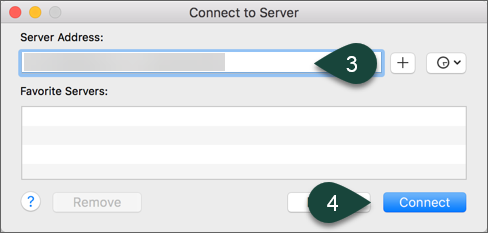
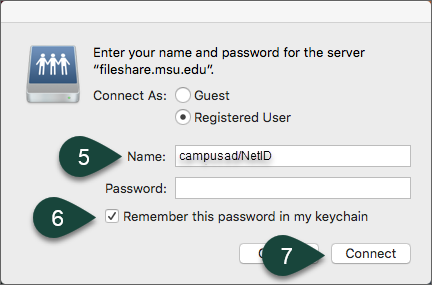
- Enter your MSU Username and Password.
NOTE: You need to enter CampusAD/NetID for the username field. - Select the checkbox for Remember this password in my keychain.
- Select Connect.
Did you find this article useful?
You Might Also Be Interested In
-
In the Field: Jenn Phillips
Published on July 6, 2018
-
Employee Antivirus Perk
Published on September 18, 2023
-
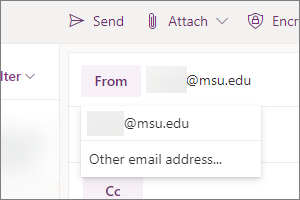
Sending from an Alternate Email Address in Spartan Mail Online (Office 365)
Published on March 31, 2021


-
Setting the Default Calendar on Apple Devices (Office 365)
Published on April 22, 2021
-
Sending from an Alternate Email Address in Outlook
Published on March 31, 2021
-
Setting Retention Policies for Spartan Mail Online (Office 365)
Published on October 1, 2017