Setting Automatic Replies in Spartan Mail Online (Office 365)
 Print
Print Email
EmailInstructions for setting up an automatic reply or out of office message in Spartan Mail (Office 365).
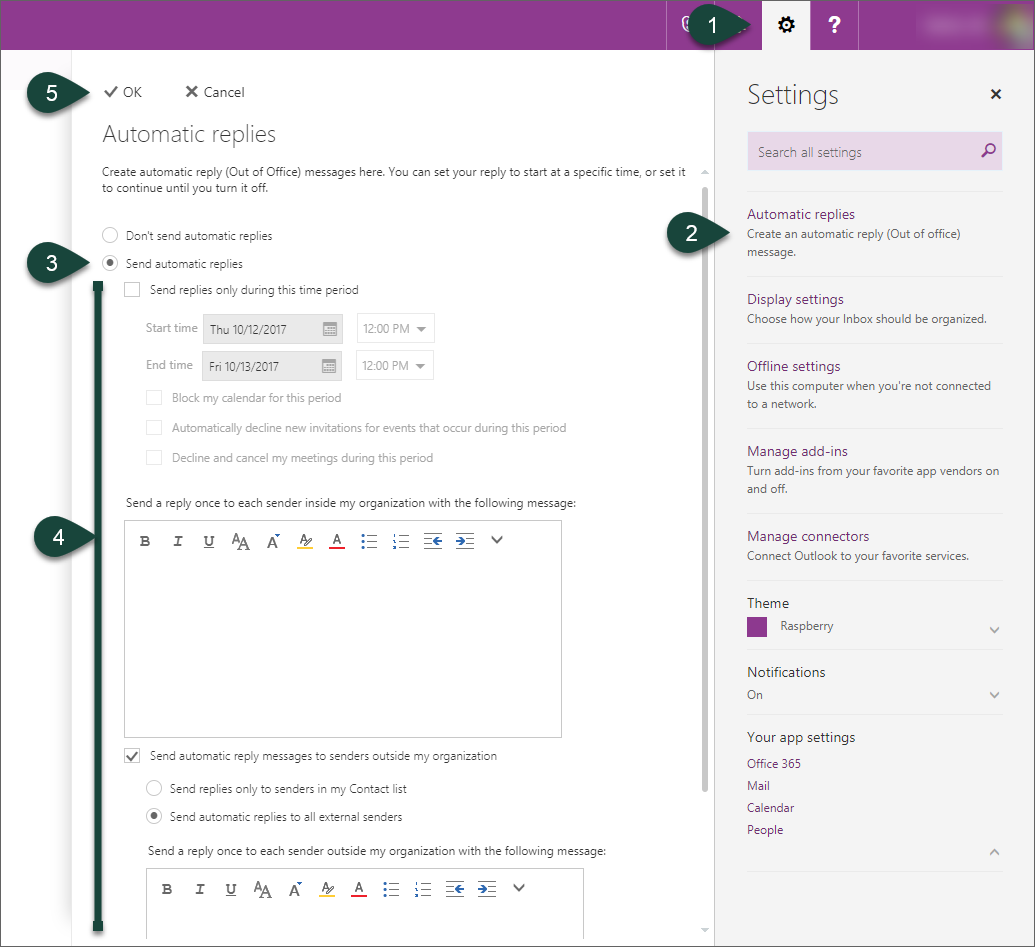
- Select the Gear Icon for settings.
- Select Automatic Replies.
- Select Send Automatic Replies.
- Input the Settings and Mail Information for you automatic reply.
- Select Ok.
Did you find this article useful?
You Might Also Be Interested In
-
In the Field: Jenn Phillips
Published on July 6, 2018
-
Employee Antivirus Perk
Published on September 18, 2023
-
Sending from an Alternate Email Address in Spartan Mail Online (Office 365)
Published on March 31, 2021


-
Mapping a Network Drive (Mac)
Published on June 4, 2020
-
Setting the Default Calendar on Apple Devices (Office 365)
Published on April 22, 2021
-
Sending from an Alternate Email Address in Outlook
Published on March 31, 2021