Focused Inbox in Spartan Mail Online (Office 365)
 Print
Print Email
EmailInstructions for turning Focused Inbox on or off for your Spartan Mail (Office 365) email.
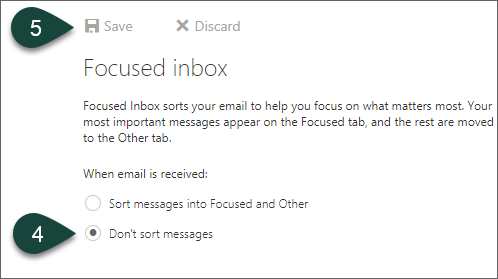
Focused Inbox sorts your email to help you focus on what matters most. Your most important messages appear on the Focused tab, and the rest are moved to the Other tab.
This setting is on by default. If you would like to turn it off so all your email comes in together, do the following:
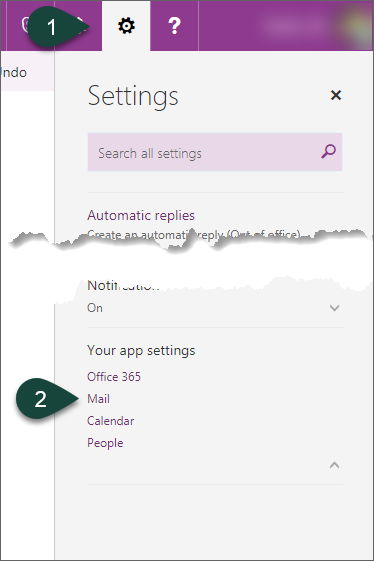
- Select the Gear Icon for settings.
- Select Mail.
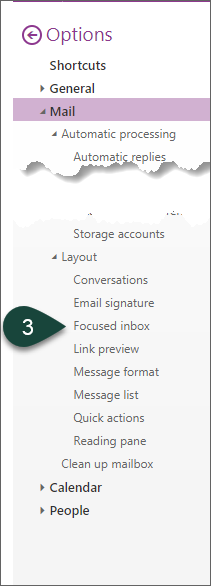
- Select Focused Inbox under the Layout section.
- Select Don't Sort Messages.
- Select Save.
Did you find this article useful?
You Might Also Be Interested In
-
In the Field: Jenn Phillips
Published on July 6, 2018
-
Employee Antivirus Perk
Published on September 18, 2023
-
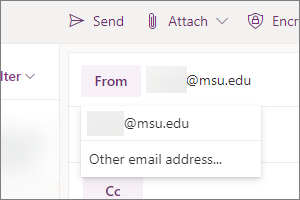
Sending from an Alternate Email Address in Spartan Mail Online (Office 365)
Published on March 31, 2021


-
Mapping a Network Drive (Mac)
Published on June 4, 2020
-
Setting the Default Calendar on Apple Devices (Office 365)
Published on April 22, 2021
-
Sending from an Alternate Email Address in Outlook
Published on March 31, 2021