Delaying Delivery in Outlook for Mac
 Print
Print Email
EmailInstructions on how to set up and email to send in the future in Outlook for Mac.
NOTE: This option is only available on the Office 365 or 2019 versions of Outlook for Mac.
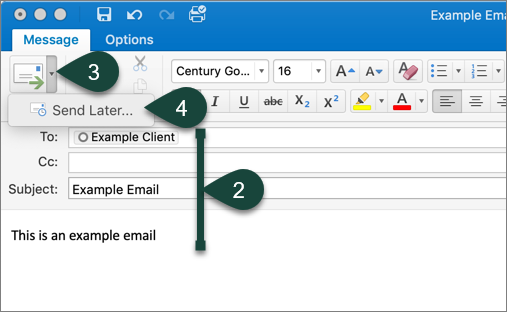
- Open a New Email.
- Complete all necessary Email Fields. (To, Subject, Content, etc.)
- Select the Down Arrow next to Send.
- Select Send Later.
- Use the Drop-Down Menus to select the Date and Time you wish to have the email delivered.
- Select Send.
NOTE: Always complete delay delivery last as the final step will automatically send the email.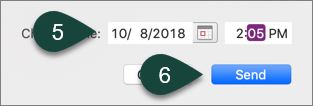
Did you find this article useful?
You Might Also Be Interested In
-
In the Field: Jenn Phillips
Published on July 6, 2018
-
Employee Antivirus Perk
Published on September 18, 2023
-
Sending from an Alternate Email Address in Spartan Mail Online (Office 365)
Published on March 31, 2021


-
Mapping a Network Drive (Mac)
Published on June 4, 2020
-
Setting the Default Calendar on Apple Devices (Office 365)
Published on April 22, 2021
-
Sending from an Alternate Email Address in Outlook
Published on March 31, 2021