Creating Rules in Spartan Mail Online (Office 365)
 Print
Print Email
EmailInstructions for creating mail handling rules in Spartan Mail (Office 365).
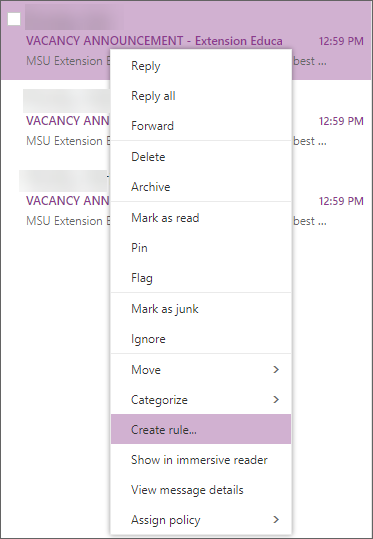 Rules can be set up manually through the below instructions or by right clicking on an email and selecting Create Rule.
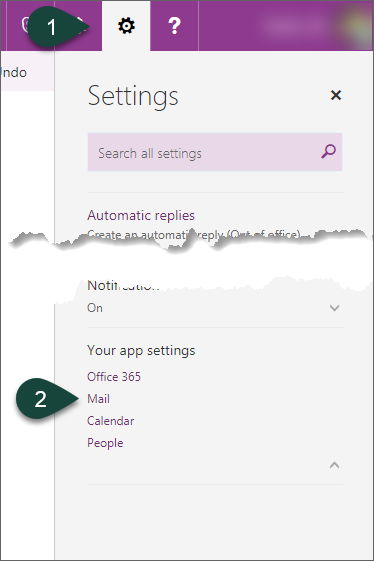
- Select the Gear Icon for settings.
- Select Mail.
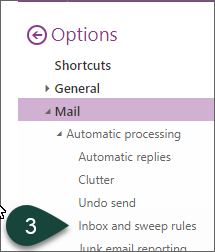
- Select Inbox and Sweep Rules under the Automatic Processing section.
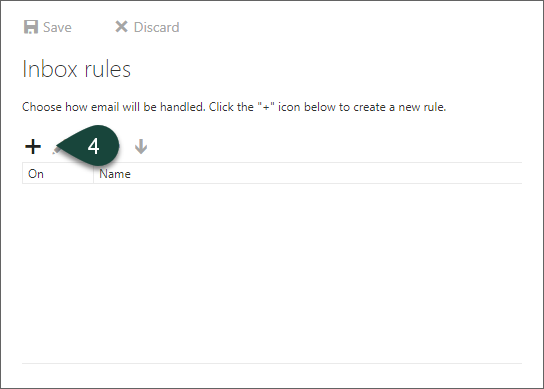
- Select the Plus Icon to add a new rule.
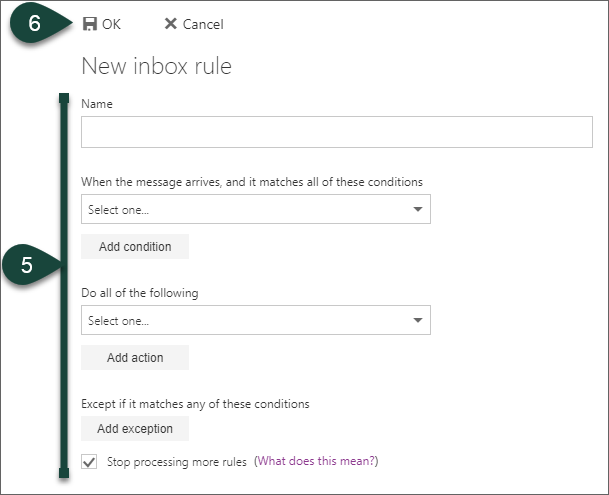
- Enter the Settings for the rule using the drop-down menus.
- Select Ok.
Did you find this article useful?
You Might Also Be Interested In
-
In the Field: Jenn Phillips
Published on July 6, 2018
-
Employee Antivirus Perk
Published on September 18, 2023
-
Sending from an Alternate Email Address in Spartan Mail Online (Office 365)
Published on March 31, 2021


-
Mapping a Network Drive (Mac)
Published on June 4, 2020
-
Setting the Default Calendar on Apple Devices (Office 365)
Published on April 22, 2021
-
Sending from an Alternate Email Address in Outlook
Published on March 31, 2021