Scheduling Rooms Using the Scheduling Assistant in Spartan Mail Online (Office 365)
 Print
Print Email
EmailInstructions for using the scheduling assistant in the calendar to schedule rooms in Spartan Mail (Office 365).
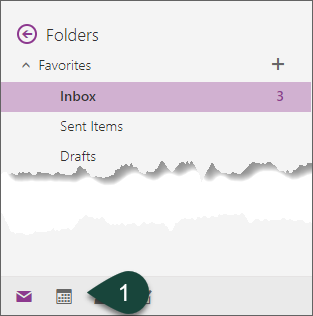
- Select the Calendar Icon at the bottom of the screen.
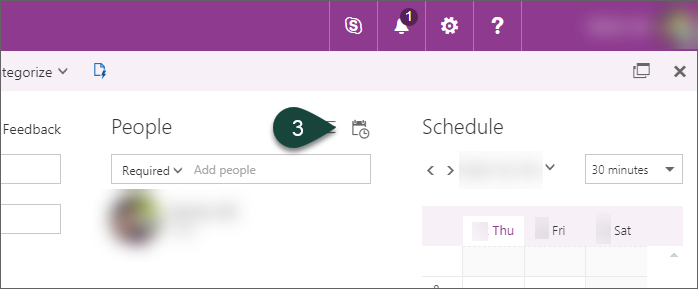
- Select the Scheduling Assistant Icon above the People search.
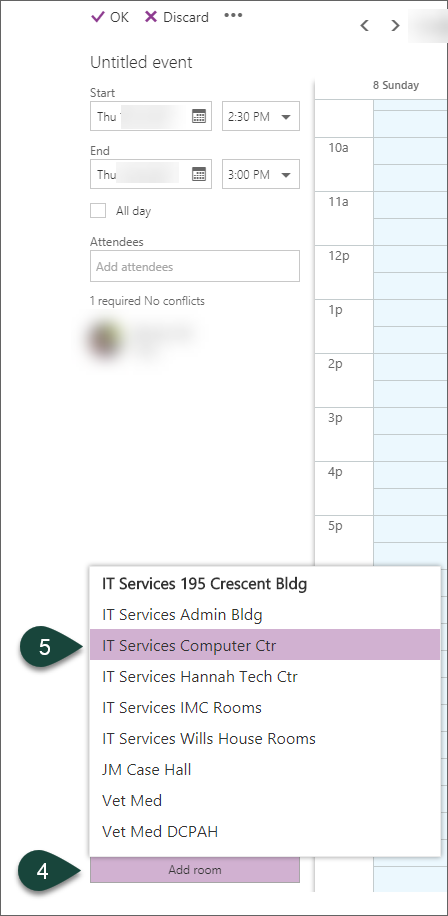
- Select Add Room at the bottom of the screen.
- Select the Building the room is in. This will load all the room calendars from the building.
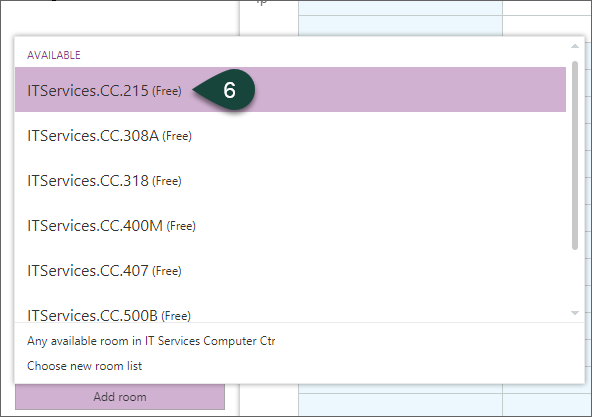
- Select the Room you wish to schedule.
- Complete the necessary portions of the calendar invitation.
Did you find this article useful?
You Might Also Be Interested In
-
Fairs and 4-H: the tradition continues in 2021
Published on August 31, 2021
-
MSU to study precision livestock farming adoption trends in U.S. swine industry
Published on March 15, 2021
-
MSU animal science professor exploring environmental benefits of regenerative agriculture
Published on February 15, 2021
-
Inspired and in-person: face-to-face programming returns for Michigan 4-H
Published on August 25, 2021
-
MSU Extension to undertake three-year, $7 million vaccination education effort
Published on August 17, 2021
-
MSU Product Center helps Michigan food entrepreneurs survive and thrive throughout pandemic
Published on August 31, 2021