Completing the Local Windows Update
 Print
Print Email
EmailInstructions for completing the local windows updates on your computer.
Ensure you are connected to the F5 Big IP Edge VPN before attempting to update Windows.
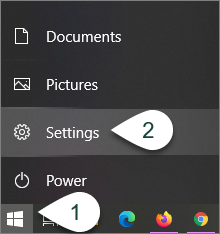
- Select the Windows Button on the toolbar.
- Select Settings.
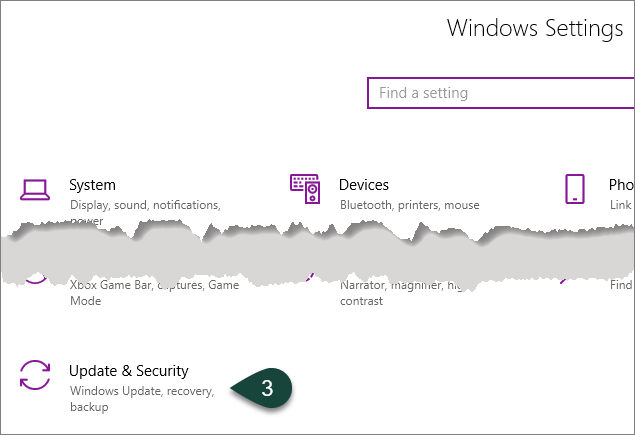
- Select Update & Security.
- Select Check for Updates.
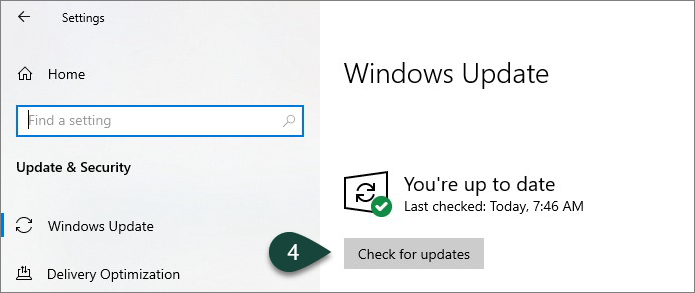
- A list of any available updates will begin downloading and installing.
- Some updates may require you to restart your computer. After each restart, you will need to reconnect to the F5 Big IP Edge VPN.
Did you find this article useful?
You Might Also Be Interested In
-
Celebrating 100 years of Michigan State University Extension in Alcona County
Published on October 19, 2017
-
Fifth annual MI Ag Ideas to Grow With virtual conference focuses on food and animal production
Published on January 27, 2025
-
Potential sources of labor: Are these in your future plans?
Published on February 29, 2016
-
Morrill Act turns 150 years old
Published on June 12, 2012
-
Michigan State University College of Agriculture and Natural Resources event to focus on soil health
Published on January 12, 2016